HL-SAT

Version 1.8.5 · 15 August 2026 · Windows 10 / 11

Server administration
that isn't stuck in 2011.

Query, monitor and administer GoldSrc and Source dedicated game servers over A2S and RCON. A modern replacement for HLSW, which stopped being developed fifteen years ago.

  • 50 MB archive
  • Single .exe
  • No installer
  • No .NET runtime needed

GoldSrc

Half-Life, Counter-Strike 1.6, Team Fortress Classic, Day of Defeat, Sven Co-op, and the rest of the HLDS family. Connectionless UDP RCON.

Source & Source 2

Half-Life 2, CS:S, CS:GO, CS2, Team Fortress 2, Garry's Mod, Left 4 Dead. TCP RCON.

No account, no tracking

No sign-up and nothing reported about you or your servers. The one request it makes on its own is a version check, at most once a day, which you can switch off.

See it

One window, the whole server.

Server details, live ping, detected addons, the player table and the RCON console — no switching between screens to piece together what's happening.
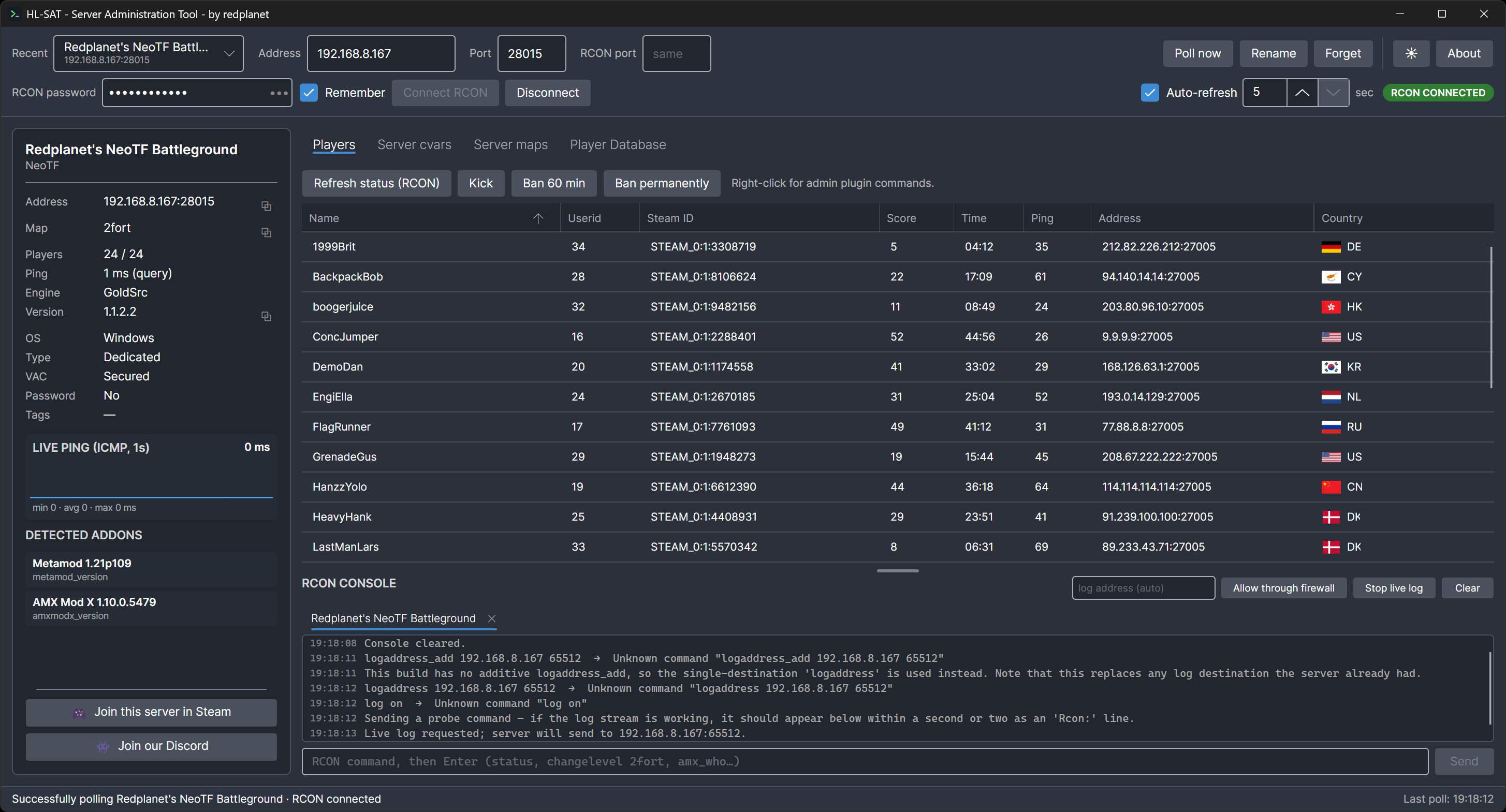
HL-SAT with RCON connected to a full 24-of-24 GoldSrc server. The left panel
                    shows address, map, player count, ping, engine, version and VAC status, a live
                    ping graph, and detected addons Metamod and AMX Mod X. The main area lists all
                    24 players with userid, Steam ID, score, time, ping and IP, above an RCON
                    console.
A full server with RCON connected. The player list, cvars and addon detection all work without it — connecting RCON is what adds the userid and Steam ID that admin commands need.

What it does

Everything HLSW did, plus what it never got around to.

Polls automatically

Type a host or IP and it starts querying as soon as the address looks complete. No button to press, and no RCON password required to see a server.

One console tab per server

A server keeps its RCON session and log feed running when you switch away, so several can be monitored at once. Each tab has its own scrollback and command history.

Live log stream

Chat, kills, connects and map changes never travel over RCON. HL-SAT subscribes to the server's UDP log feed with logaddress_add and colour-codes events as they arrive.

Player list, with or without RCON

A2S alone gives you names, scores and time played. Connecting RCON merges in the userids and Steam IDs from status that admin commands need.

Admin actions that adapt

Kick and ban using stock server commands, plus right-click menus for AMX Mod X and SourceMod — gag, mute, silence, slap, slay, ban IP — each shown only when that platform is actually detected.

Where they're connecting from

A flag and country code beside each player's address, in the live list and the player database alike. Resolved on your machine from an embedded database — no address is ever sent anywhere. Needs RCON, since A2S never reports player IPs.

Known players database

Every player seen is recorded with Steam ID, last IP, first and last seen, appearance count and previous names. Searchable, with flags for banned, friend, regular, watch and annoying.

Addon detection

Metamod, AMX Mod X, SourceMod, Mani Admin Plugin, PunkBuster, HLstatsX and others, recognised from the cvars a server publishes.

Server cvars

The complete A2S_RULES table with a live filter, so you can find the one setting you came for without scrolling.

Join through Steam

One click launches the right game via Steam and connects straight to the server you're looking at.

Light and dark

Both themes carry their own console and player-flag palette, because one set of colours cannot stay legible on both backgrounds.

Lives in the tray

Closing the window hides it rather than quitting, because your servers stay connected while it's out of the way.

Remembers where you've been

Every server that answers is saved to a recent list, most recent first, with its RCON password encrypted at rest.

Coming from HLSW

Your old player database still opens.

HLSW stored known players in a .db7 file, a format it never documented and whose source was never released. HL-SAT reads it anyway — the layout was recovered by inspecting a real file and verified against a 213-record database, parsing it to the exact byte.

Players are matched by Steam ID. Old names are added to the alias history, and notes are only written where there isn't already one, so re-running an import is safe.

Anything carrying a note or a non-default category is flagged Watch for review, rather than having a meaning guessed at for it.
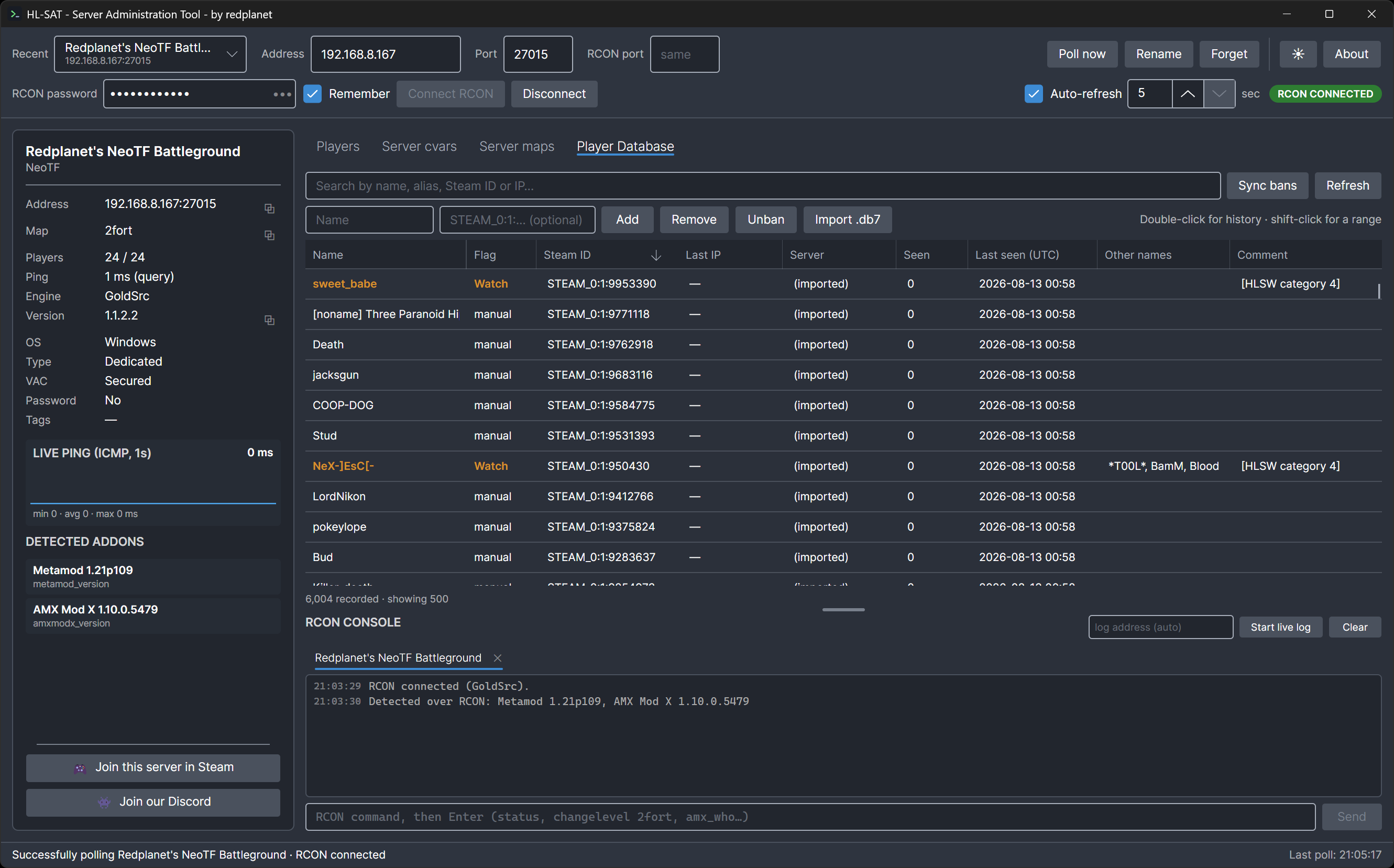
The Player Database tab, listing thousands of imported players with their
                    flag, Steam ID, server, times seen, last seen date, previous names and the
                    comment carried over from HLSW. Watch-flagged players are shown in amber.
A legacy HLSW database after import — 6,004 players, with aliases, flags and the original notes carried across. Searchable by name, alias, Steam ID or IP.

Get started

Three steps, no installer.

  1. Download and unpack

    The archive holds a single self-contained executable. Put it anywhere you like — there is nothing to install and no runtime to fetch first.

  2. Run it

    Windows SmartScreen may warn on first launch, as it does for any executable without a paid code-signing certificate. Choose More info then Run anyway.

  3. Type an address

    A hint points at the address box on first launch. Enter a host or IP, press Enter, and the server appears once it answers.

One thing that trips people up

On stock HLDS the query port is the game port. There is no separate query port, whatever a control panel might show you. The RCON port field exists only for hosts that remap it.

Version 1.8.5, released 15 August 2026. Windows 10 or 11, 64-bit. Roughly 50 MB.

Changelog

What changed.

  1. 1.8.5 15 August 2026

    • Sorting the player database now sorts the whole thing. The list shows 500 players at a time, and a column header used to sort only those 500 — so on a database of several thousand, sorting by name gave you the alphabetical order of the most recent 500 rather than an answer about your database. The ordering is now done across every player before the page is taken.
    • Name and Flag can be sorted for the first time, and "Other names" sorts by the name it leads with. Country cannot be sorted — it is worked out from each player's address as the row is drawn, so there is nothing stored to order by — and its header now says so rather than ignoring the click.
  2. 1.8.4 15 August 2026

    • A damaged HLSW database no longer costs you the rest of the file. A player database that had two small holes in it — 10 bytes and 23 bytes, in a file of 7,923 records — used to import 1,069 players and stop. The importer now finds its way back to where records resume, and reads 7,921 of 7,923.
    • The import summary now accounts for every record in the file. Records carrying a Steam ID and no name are counted and explained instead of quietly going missing, damaged sections are reported with the byte offset they were found at, and a Steam ID repeated inside one file is no longer counted as a merge into a player you already had.
  3. 1.8.3 14 August 2026

    • Closing the window now asks whether to minimize to the tray or exit. It used to hide to the tray silently, which looked like quitting while HL-SAT was still polling and holding its RCON sessions open.
    • Fixed: selecting a range of console lines did not actually work in 1.8.2. Each line was its own selectable text control, which swallowed the click before the row ever saw it. Click, shift-click and Ctrl+A now select rows, and Ctrl+C copies them.
  4. 1.8.2 14 August 2026

    • Importing an HLSW database no longer gives up on one bad record. A damaged record is skipped and the rest still comes through, and the import ends with a summary of what was added, merged and — where it happened — what could not be read.
    • Fixed: the importer read past the end of the file, so anything after the last record was parsed as one. That is what produced errors like "invalid Steam ID component" on databases that were otherwise fine.
    • The RCON console can now select a range of lines — click, shift-click, Ctrl+A — and copy them with Ctrl+C.
    • The title bar shows the running version, Recent is now Favorites and its box is wide enough for a real server name.
  5. 1.8.1 14 August 2026

    • Nothing new — a re-release of 1.8.0 under a fresh version number, so that every install ends up on the corrected Admin Mod build. 1.8.0 was rebuilt more than once on the day it went out, and an install already reporting 1.8.0 would never have been offered the later one.
Older releases
  1. 1.8.0 14 August 2026

    • Admin Mod now appears in the right-click menu on the player list, alongside AMX Mod X and SourceMod — slap, slay, gag, kick and ban, built with Admin Mod's own syntax.
    • NeoTF servers are now recognised, with the version shown in Detected addons. Its admin commands are client-side and cannot be issued over RCON, so no menu claims otherwise.
  2. 1.7.3 14 August 2026

    • Fixed: an update check that could not reach the server still counted as done, so a single launch with no connection stopped HL-SAT looking again for a day — and restarting did not help.
  3. 1.7.2 14 August 2026

    • Fixed: after using Forget, the recent-server list and the address bar could point at different servers, and picking that entry again did nothing at all — leaving the port on the previous server.
  4. 1.7.1 14 August 2026

    • Fixed: every AMX Mod X ban from the right-click menu failed with "client with that name or userid not found". The command had its arguments the wrong way round, so the server was looking for a player named after the ban duration.
    • Fixed: right-clicking the console offered a Copy that did nothing. It now has Copy line and Copy whole console.
  5. 1.7.0 14 August 2026

    • Update check. HL-SAT looks for a newer version when it starts, at most once a day, and offers to download it. Nothing about you or your servers is sent, and you can switch it off in About.
    • A Check for new version button and a changelog link in About.
  6. 1.6.0 14 August 2026

    • A country flag beside every player's address, in both the live player list and the player database. Resolved offline from an embedded database — no address is sent anywhere.
  7. 1.5.3 13 August 2026

    • Fixed: player names were invisible in the Player Database. Every unflagged player showed a blank Name column, though the record itself was intact.
  8. 1.5.2 13 August 2026

    • Console tabs can now be closed with an ×, which disconnects that server.
    • Fixed: the right-click menu on the player grids jumped to wherever the mouse was, roughly once a second.
    • The About box now shows the release date.
  9. 1.5.1 13 August 2026

    • Fixed: a failed settings write could take the whole app down mid-click. Preferences that cannot be saved are now logged and ignored.
  10. 1.5.0 13 August 2026

    • Several servers at once, each with its own console tab, staying connected and logging while you work on another.
    • Reveal button on the RCON password field.
    • A notice when closing to the tray, since the app keeps running there.
    • Separate console and player-flag colours per theme, so light mode is legible.

Credits

A special thank you to:

  • [APG]RoboCop[CL] — for testing the Admin Mod commands and the HLSW .db7 import against real servers and real databases. Both had faults that only showed up outside a test harness, and both were fixed because of those reports.
  • DB-IP — country lookup uses the IP to Country Lite database, licensed CC BY 4.0 and queried entirely on your own machine. Flag artwork is public domain.